
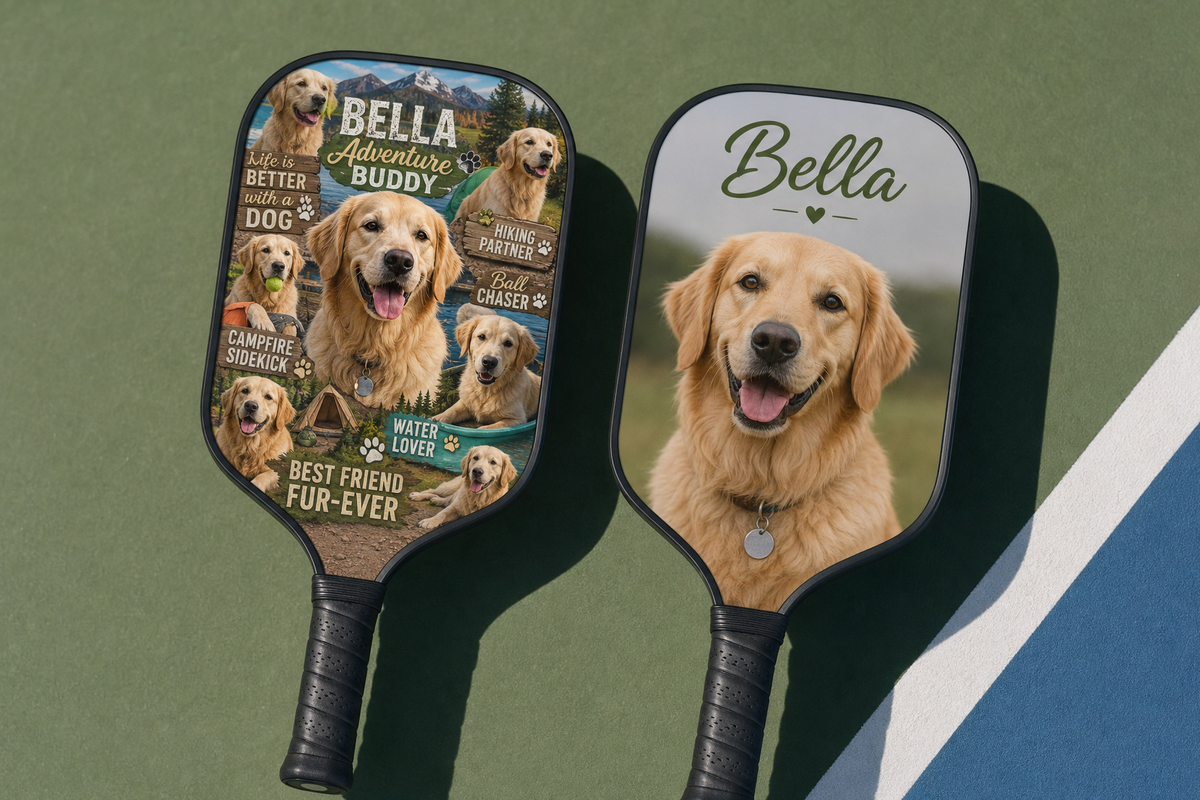
A pet photo pickleball paddle can be a great custom gift, but the result depends heavily on what you upload. The best paddle design usually starts with a clear pet photo, a simple crop, enough breathing room around the face, and text that stays readable once printed on a paddle-shaped surface.
This guide is for shoppers who already like the idea of a custom paddle and want to avoid the common upload mistakes: blurry images, awkward cropping, tiny text, busy backgrounds, and designs that look good on a phone but feel cluttered on the court.
Quick answer: choose a high-resolution, well-lit pet photo where the face is not cut off; keep the background simple; place key details away from the paddle edge; limit text to one short phrase or name; and preview the design at a small size before ordering.

Before You Upload: What Makes a Pet Photo Work on a Paddle?
A phone screen is forgiving. A pickleball paddle is not. The paddle face has a defined shape, a handle area, and edges that can make a perfect square photo feel cramped. A strong design is less about using every inch of space and more about making the pet instantly recognizable.
For most shoppers, the safest approach is a close portrait of your pet with the eyes, nose, and expression clearly visible. If the photo tells you “that is absolutely my dog” or “that is exactly my cat’s personality” within one second, it is probably a better candidate than a distant full-body photo.
The three-second test
Open the image on your phone and shrink it down until it is roughly the size of a paddle preview. If you can still identify the pet’s face and expression in three seconds, the image has a good chance of working. If you need to zoom in, the final paddle may feel unclear from normal viewing distance.
- Best: bright portrait, sharp eyes, uncluttered background, pet centered with room around the head.
- Usable with editing: cute pose with a distracting background, slightly off-center subject, or extra objects that can be cropped out.
- Risky: dark indoor photo, motion blur, tiny pet in a large scene, screenshot, or heavily filtered social media image.
Photo Quality: Resolution, Sharpness, and File Choice
Print quality is not only about whether a file “looks fine” on your screen. The final result depends on the actual image pixels, how much the photo must be enlarged, and whether the important parts of the image remain sharp after cropping. Adobe’s guidance on image resolution for printing explains the relationship between resolution, image size, and print output. Printful’s DPI and actual print file size guidance makes a similar point: DPI numbers only make sense when you also consider the intended print size.
In practical terms, do not choose the smallest or most compressed version of your pet photo. Use the original file when possible, not a screenshot from a messaging app or a saved social media preview. Screenshots and re-saved images often lose detail, especially in fur texture, whiskers, eyes, and shadow areas.
| Upload choice | Why it matters | Better option |
|---|---|---|
| Original camera photo | Usually preserves the most detail available from the device. | Best starting point when the pet is sharp and well lit. |
| Screenshot from Instagram, text, or chat | May be compressed, resized, or missing fine detail. | Ask for the original photo file instead. |
| Heavily filtered image | Can exaggerate contrast or colors and reduce natural detail. | Use a lightly edited version with natural tones. |
| Dark indoor photo | Shadows may hide the pet’s face and create noise when brightened. | Choose a brighter photo or take a new one near a window. |
A simple sharpness check
- Open the photo at full size.
- Zoom in to the pet’s eyes and nose.
- Check whether the edges look crisp or smeared.
- Look for motion blur around ears, whiskers, fur, or collar tags.
- If the face is soft before you upload, choose another image.
You do not need to become a print technician before buying a custom paddle. You just need to avoid the obvious weak files. When in doubt, pick the clearest original portrait rather than the funniest but blurriest moment.
Crop Strategy: Keep the Pet Recognizable After the Paddle Shape
The most common design issue with a pet photo pickleball paddle is over-cropping. A pet’s head may look perfect inside a square preview, but the paddle’s edge can remove ears, whiskers, a fluffy outline, or background space that helped the design breathe.
The safer crop is usually a portrait with extra room around the head. If the ears, cheeks, or collar are already touching the edge of the image, the design can feel squeezed after upload. Printful’s explanation of the safe print area is useful here: important content should stay inside the safe zone, not at the outer edge where trimming, shape, or layout variation can affect the result.
Use this pet portrait crop framework
| Design goal | Best crop | What to avoid |
|---|---|---|
| Show the pet’s face clearly | Head and upper chest, eyes near the upper third. | Extreme close-up where ears or chin are cut off. |
| Create a playful gift | Face centered with space for a short name or phrase. | Adding too many captions, dates, and icons. |
| Use a full-body pose | Pet standing or sitting with clean background and clear outline. | Tiny pet in a large room, yard, or group photo. |
| Memorial or sentimental design | Calm portrait with subtle text and enough quiet space. | Busy collage that makes the pet less visible. |
If you want broader custom design inspiration beyond pets, Lumo’s guide to pickleball paddle design ideas can help you compare photo-forward, pattern-forward, and typography-forward directions before you settle on one layout.
Background Choices: Remove, Blur, Replace, or Keep?
The background can make or break the design. A pet photo taken in a kitchen, car, couch corner, or backyard may have emotional value, but not every background helps the paddle. Your goal is not to erase personality; it is to decide whether the background supports the pet or competes with it.
Option 1: Keep the original background
This works when the background is clean and part of the story. A dog on a beach, a cat in a favorite sunny window, or a horse in a field can create context. Keep it if the pet remains the clear subject.
Option 2: Use a clean color or simple pattern
This is often the most gift-friendly choice. A simple background makes the pet easier to see and leaves room for a name. If your pet has dark fur, choose a lighter background. If your pet has white or cream fur, avoid a pale background that makes the outline disappear.
Option 3: Use a cutout portrait
A cutout can look polished when the fur edges are handled carefully. It can also look awkward if whiskers, ears, or fluffy outlines are chopped too sharply. If you use a cutout, inspect the edges before uploading. Pets with long fur may need a softer treatment than short-haired pets.

Text on a Pet Paddle: Less Usually Looks Better
Text is where many custom paddles become cluttered. A name can be charming. A short phrase can be funny. A long sentence, multiple fonts, a date, a nickname, a hashtag, and a paw-print icon all competing with the pet photo can make the design harder to read.
For a pet photo pickleball paddle, treat text as a supporting detail. The pet should remain the main character.
Text ideas that usually work
- The pet’s name: “Milo,” “Luna,” “Bailey,” or “Pickles.”
- A short court phrase: “Dink for Daisy,” “Paws & Paddles,” or “Team Cooper.”
- A gift phrase: “Dad’s Doubles Partner” or “Mom’s Court Coach.”
- A memorial phrase, if appropriate: “Always with me” or a simple name and year.
Text rules before upload
- Limit the message. One name plus one short phrase is usually enough.
- Use contrast. Dark text on a dark dog photo will disappear; light text on a pale cat may do the same.
- Place text away from the edge. Keep names and phrases inside the safe area.
- Preview small. If you cannot read it in a small preview, it may not be practical on the paddle.
- Avoid covering the face. Text across eyes, nose, or ears usually weakens the design.
If you are deciding whether to customize at all or choose a ready-made graphic, Lumo’s comparison of custom vs. stock pickleball paddles is a useful next read. A pet photo design is personal by nature, but a stock paddle can still be the better choice when the buyer wants a neutral look or needs less decision-making.
Design Direction: Cute, Clean, Sporty, or Gift-First?
Before uploading, choose the emotional direction. This sounds simple, but it prevents random choices. A paddle for weekly play may need a cleaner layout than a novelty gift. A memorial paddle may call for subtle tones. A birthday paddle can be brighter and more playful.
| Direction | Best for | Design choices | Potential downside |
|---|---|---|---|
| Cute portrait | Pet lovers, birthdays, casual players | Large face, pet name, soft or bright background | Can become too busy if you add many icons |
| Clean minimalist | Players who want a custom paddle that still looks refined | One strong photo, simple background, small name | May feel too plain for a novelty gift |
| Sporty graphic | Players who want energy and court personality | Bold crop, movement lines, team-style phrase | Photo must be strong enough to compete with graphics |
| Sentimental gift | Memorials, anniversaries, family gifts | Calm portrait, restrained text, balanced spacing | Requires extra care with tone and wording |
For more design-forward thinking, Lumo’s designer pickleball paddles personalized guide covers how personalization choices affect the overall look, not just the image upload.
One Pet, Two Pets, or a Collage?
A single pet is the easiest design to make clear. Two pets can work if both faces are sharp and similar in size. A collage is possible, but it is also where readability often drops. On a paddle face, each added photo reduces the visual space available for every pet.
When a one-pet design is the better choice
- The pet has a distinctive expression you want to feature.
- The buyer wants the paddle to look clean and playable, not like a scrapbook.
- The available photos of the second pet are lower quality.
- The design includes a name or short phrase.
When a two-pet design can work
- Both pets are in the same high-quality photo.
- Their faces are close together and similarly lit.
- You can place them without cutting off ears or heads.
- You are willing to keep text minimal.
When a collage is risky
A collage can be emotionally meaningful, but it usually needs careful spacing. If you use four or more photos, the paddle may look better up close than during play. A more reliable option is one hero pet image on the front and a simpler supporting design direction, rather than trying to show every favorite moment at once.
Design Mistake Audit: Check These Before Ordering
Use this audit after you build the design but before you complete the order. It is intentionally practical: if you cannot answer “yes” to most of these, revise before uploading or finalizing.
- Is the pet’s face the clear focal point? If your eye goes to the couch, rug, car seat, or text first, simplify.
- Are the eyes sharp? For pet portraits, eyes carry much of the emotional impact.
- Is there room around ears, whiskers, and fur? Avoid placing key features against the paddle edge.
- Is the background helping? Remove or simplify distractions that compete with the pet.
- Can you read the text at preview size? If not, enlarge it, shorten it, or increase contrast.
- Is the design balanced with the handle area? Do not place important content where the paddle shape interrupts it.
- Does the gift tone match the recipient? A funny paddle for a serious player may not land the same way as a clean portrait design.
- Did you use the original image file? Avoid screenshots when you can access the original photo.
Practical rule: if the design looks slightly too simple on screen, it may be just right in real life. If it already looks crowded in the preview, it will probably feel crowded on the paddle.
Performance Considerations: Design Is Not the Only Choice
This article focuses on image upload and layout, but shoppers often ask whether a custom design changes how a paddle plays. The safer answer is that the paddle’s construction, surface, texture, weight, and manufacturing choices matter for play feel. The printed design is one part of the product experience, not the only performance factor.
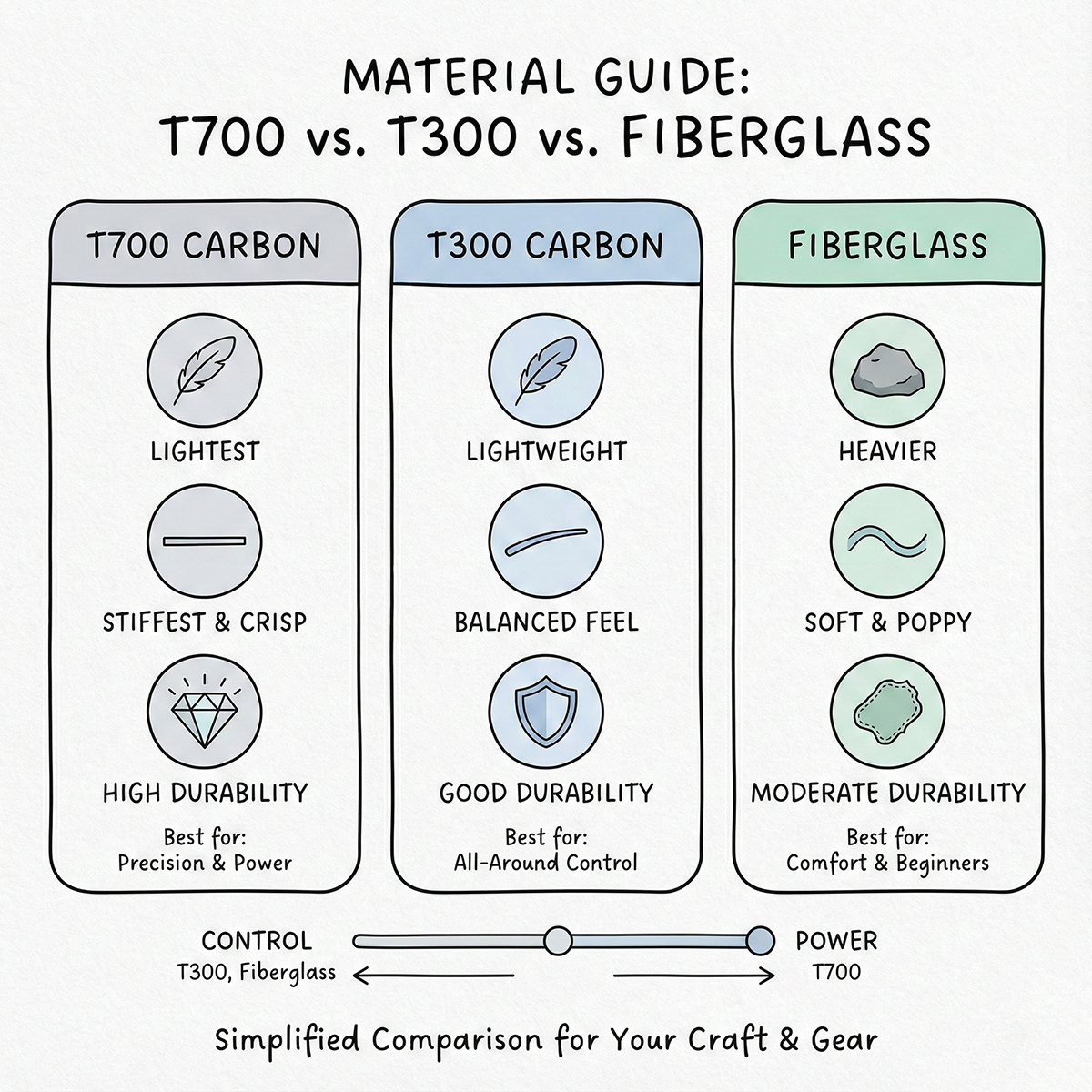
If you are comparing customization with paddle performance, read Lumo’s guide on why surface texture and print layer matter in pickleball paddle design. If you are also researching materials, Lumo’s article on fiberglass vs. T300 and T700 carbon for budget custom paddles can help you think beyond the artwork.
In other words, do not choose only by the pet photo. Choose a paddle that fits the player, then use the photo design to make it personal.
Gift Planning: How to Choose a Pet Paddle for Someone Else
A pet photo paddle is often bought as a gift for a dog parent, cat parent, spouse, teammate, parent, or pickleball friend. The design decision is slightly different when the recipient is not you. You need to consider both emotional impact and whether they would actually want to bring it to the court.
Fit: a pet photo paddle is probably a good gift if...
- The recipient talks about their pet often.
- They already enjoy playful or personalized gear.
- They play pickleball casually or socially.
- You have access to a clear, high-quality pet photo.
- The pet has a recognizable expression or pose.
Not-fit: consider another design if...
- The recipient prefers very minimal or plain sports gear.
- You only have low-quality screenshots or blurry photos.
- You are unsure whether the pet image has sentimental sensitivity.
- The paddle is for a competitive player who cares more about construction details than artwork.
If the gift recipient is performance-focused, it may help to review Lumo’s complete guide to customizing a pickleball paddle before you finalize the design. That broader guide can help you think about customization as a whole, not just the image.
Pre-Upload Checklist for a Pet Photo Pickleball Paddle
Before you upload your image to create a pet photo pickleball paddle, run through this short checklist. It is the easiest way to catch problems while you still have time to change the file.
- Photo source: I am using the original image file when possible, not a screenshot.
- Sharpness: The pet’s eyes and face look clear when I zoom in.
- Lighting: The face is not hidden in shadow.
- Crop room: Ears, whiskers, and fur are not pressed against the image edge.
- Safe area: Names, phrases, and important face details are away from the paddle edge.
- Background: The background supports the pet or has been simplified.
- Text: The wording is short and readable.
- Gift tone: The style fits the recipient: cute, clean, sporty, or sentimental.
- Preview: The design still makes sense when viewed small.
Mini FAQ
What is the best photo for a pet photo pickleball paddle?
The best photo is a sharp, well-lit portrait where the pet’s eyes, nose, and expression are clear. A simple background and extra space around the head make the design easier to crop for a paddle shape.
Can I use a screenshot of my pet?
You can, but it is not ideal. Screenshots are often smaller or more compressed than the original photo. If possible, use the original camera file or ask the person who took the photo to send it without compression.
Should I remove the background?
Remove or simplify the background if it distracts from the pet. Keep the original background if it is clean, meaningful, and does not compete with the face.
How much text should I add?
Keep text short. A pet name or one short phrase usually works better than a long quote. Make sure the text stays readable in the preview and does not cover the pet’s face.
Is a collage a good idea?
A collage can work for sentimental gifts, but it is easier for the design to become crowded. For the clearest result, choose one hero photo or two strong pet portraits rather than many small images.
References and Further Reading
- Adobe: Resolution specs for printing images
- Printful: DPI, resolution, and actual print file size
- Printful: What is the safe print area?
Final Takeaway
A good pet paddle design is not complicated, but it does require restraint. Start with the clearest original photo, crop with room around the pet, keep important details inside the safe area, simplify the background, and use short text that supports the portrait instead of overpowering it.
If you are customizing through Lumo, treat the upload step as the final design check, not just a file transfer. A few minutes spent choosing the right pet photo can make the difference between a paddle that feels busy and one that feels personal, readable, and gift-ready.


Dejar un comentario
Este sitio está protegido por hCaptcha y se aplican la Política de privacidad de hCaptcha y los Términos del servicio.